The Fifine SC3: A Solid Entry-Level Mixer That Actually Delivers
So here's the thing about budget audio gear: most of it is terrible, some of it is surprisingly decent, and once in a while something comes along that makes you think "wait, this actually works." The Fifine SC3 Gaming Audio Mixer falls squarely into that last category, and after spending some quality time with it, I can tell you why it might just be the interface you didn't know you needed.
First Impressions: More Than Just Pretty Lights
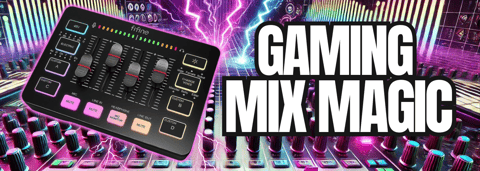
Let's address the elephant in the room first. Yes, this thing lights up like a gaming keyboard from 2015. But before you write it off as all flash and no substance, hear me out. Those RGB lights aren't just for show (though they do look pretty cool). You can cycle through different patterns, adjust the colors to match your setup, or turn them off entirely if you're going for a more professional vibe. The fact that Fifine gave you the option to disable them entirely shows they understand not everyone wants their studio looking like a rave.
The build quality surprised me. For something in this price range, the SC3 feels solid without being heavy. Sure, it’s mostly plastic. A lot of more expensive interfaces are too. The knobs have a nice tactile feel, and the buttons respond well without feeling cheap or mushy. It's not going to win any industrial design awards, but it's definitely built to last through regular use.
The Good Stuff: What Actually Works
The combo XLR/quarter-inch input is genuinely useful. Whether you're plugging in a dynamic mic for podcasting or want to run an instrument through it, the SC3 handles both without breaking a sweat. The dynamic/condenser switch with phantom power means you can use pretty much any microphone you throw at it, though I'd still recommend sticking with dynamics unless you've got your room acoustics dialed in.
Those custom sound pads are where things get interesting. Being able to record up to 15 seconds of audio directly onto the device opens up some creative possibilities. Podcast intros, sound effects, or even just having your catchphrase ready to go at the touch of a button. It's not revolutionary, but it's genuinely handy when you're in the middle of a live stream and need something quickly.
The voice effects are... well, they're there. The male and female voice options might be useful for content creators who want to disguise their voice, and the robot and monster settings could work for specific gaming scenarios. The baby voice is hilariously ridiculous, and the elder setting sounds like you're perpetually yelling at kids to get off your lawn. Are they professional quality? Absolutely not. Are they fun? Sure, if that's your thing.
The Line-In Reality Check
Here's where things get practical. The line-in functionality means you can pipe in audio from your phone, tablet, or any other device. This is huge for streamers who want to add music or sound effects without dealing with complicated software routing. The included cable makes it plug-and-play simple, which is exactly what you want when you're trying to focus on content instead of technical setup.
The monitoring capabilities work as advertised. You can hear yourself clearly through headphones, mute various inputs independently, and adjust levels on the fly. The visual level indicator keeps you out of the red zone, which is crucial for maintaining clean audio.
Where It Falls Short
Let's be honest about the limitations. The auto-tune feature feels gimmicky and makes everything sound processed in an unnatural way. Unless you're specifically going for that T-Pain effect (and why would you be in 2025?), you'll probably leave this feature alone.
The voice effects, while fun, aren't something most serious content creators will use regularly. They change your gain levels unpredictably, which means you'll need to readjust your input levels when switching between effects and your normal voice.
And while the device handles basic mixing well, don't expect miracles. This isn't a professional-grade interface that's going to compete with higher-end options. It's an entry-level device that does entry-level things competently.
The Bottom Line
The Fifine SC3 succeeds because it knows exactly what it is. This isn't trying to be a professional mixing board or a high-end audio interface. It's designed for gamers, new podcasters, and streamers who want decent audio quality with some fun features thrown in, all without breaking the bank.
If you're just starting out in content creation and need something that works reliably without requiring an audio engineering degree to operate, the SC3 hits that sweet spot. The combination of XLR input, line-in capabilities, custom sound pads, and straightforward controls makes it genuinely useful for its intended audience.
The RGB lighting might seem frivolous, but it actually serves a purpose for streamers who want their gear to match their aesthetic. And the fact that you can turn it off means it won't alienate users who prefer a more chill setup.
Who Should Buy This
The SC3 makes sense if you're a beginner who wants room to grow, a gamer looking to upgrade from a basic USB headset, or someone who needs a simple solution for adding sound effects and music to their streams. It's also a solid choice if you want to test the waters of content creation without investing in expensive gear upfront.
Don't buy it if you're looking for pristine audio quality or professional features. This is a stepping stone device, and there's nothing wrong with that.
The Fifine SC3 proves that budget gear doesn't have to be garbage. It's a competent, well-designed interface that delivers on its promises. Sometimes that's exactly what you need.

Chief Content Entrepreneur, Cast Ahead
With a 25+ year history in the music industry with Sony, driven and passionate entrepreneur Chris Stone founded the Podcast and Live Streaming Consultancy Cast Ahead after the success of his own co-hosted podcasts changed his life. At Cast Ahead, Chris thrives on enabling driven entrepreneurs, influencers, thought leaders and enterprises to express their story and elevate their reach.
In the same way Chris was able to work with multi-platinum artists, record label executives and creatives of all levels – he’s found great joy seeing other Live Streamers, Keynote Speakers and Podcasters achieve their own creative, financial, physical and spiritual success. He’s produced videos for keynote speakers like Victor Antonio and Sam Silverstein, produced virtual, physical and hybrid live conferences for corporations, consulted, developed and produced podcasts like Sales Influence, The Big Ticket Life, The Sales Energizer, The Pete Primeau Show, Lancaster Connects and many more.
Chris also co-hosts an Amazon Live show “Dealcasters” with Jim Fuhs of Fuhsion Marketing. Dealcasters are Livestreaming Amazon Influencers who interview experts and entrepreneurs while training Amazon customers how to overcome the fear of technology, start and flourish in their content creator journeys. In just over a year, Dealcasters have established themselves as a trusted authority not only in the live video and podcasting space, but also in the education of the Amazon Influencer program and the development of Influencers already on the platform. They’ve spoken on stages and virtually at PodFest …Read More

Your Audience Will Forgive Bad Video. They Will Never Forgive Bad Audio.